PROJECT SUMMARY
Role
Lead Designer
Platform
Smart Screen (Embedded)
Nexus Web (Internal)
WingspanAI Web + Mobile
Teams
Impact
*Note: Selected screens are shown; full internal docs are omitted.
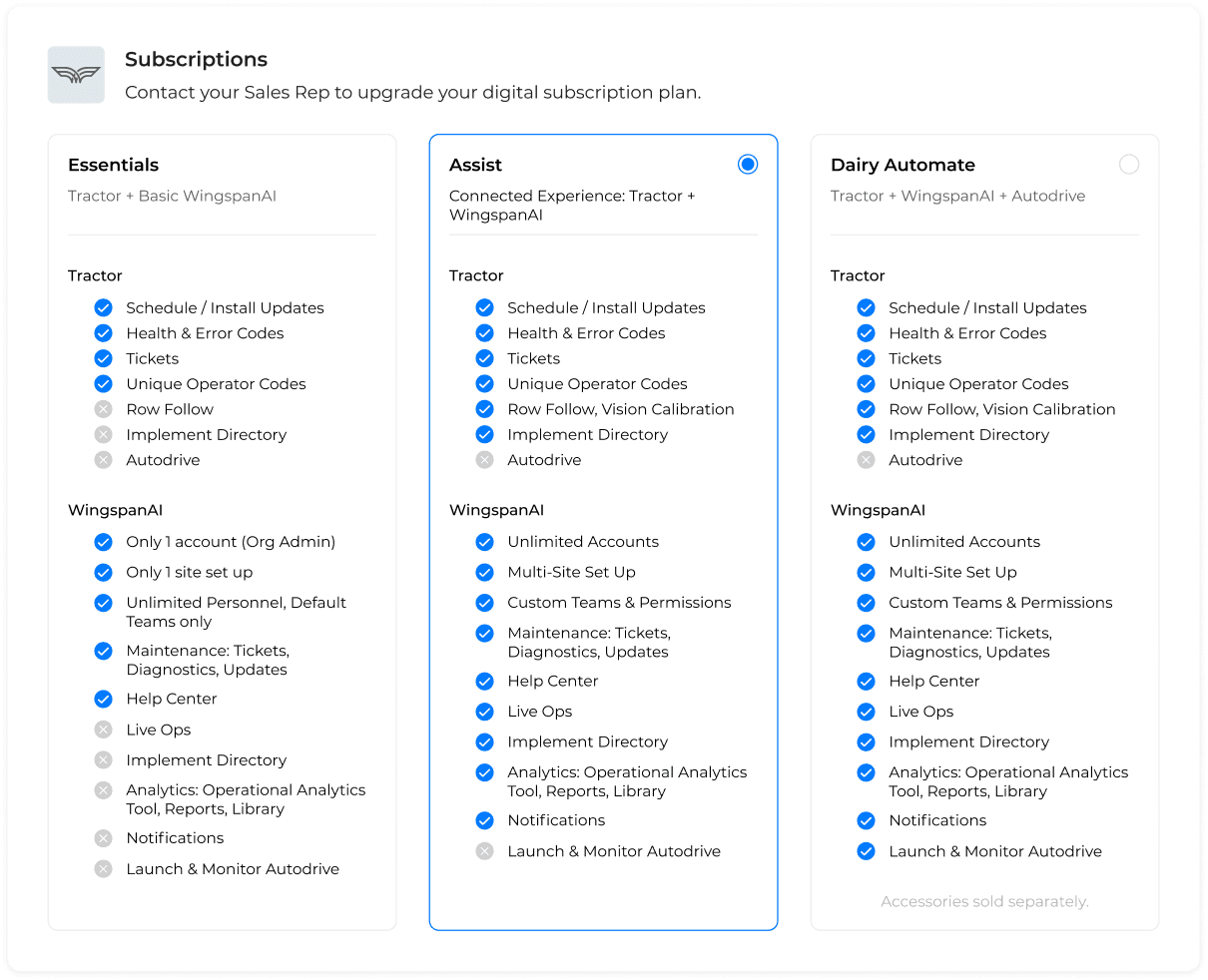
When we transitioned to a more complex subscription model with multiple tiers (Essentials, Assist, and Automate), we faced a significant challenge: many of our users were still on outdated plans, unaware that their initial subscriptions had long expired. The goal was to create a smooth transition for customers, educate them on the new plan structure, and ensure they had access to correct features without disruptions. This required a comprehensive strategy that addressed both the technical and user experience aspects of moving to the new model, while ensuring service continuity.
USER PROBLEM
Customers needed to understand what changed, what they still had, and what to do next without confusion or disruption.
HYPOTHESIS
We believe customers will transition confidently when plan status is explicit, plan value is easy to compare, and tier-aware access states behave consistently across web, mobile, and embedded states.
1
BUSINESS PROBLEM
Legacy plans created misaligned feature access and ongoing cost, and the transition could not break service-critical workflows.
HYPOTHESIS
We believe we can reduce cost leakage and improve conversion by migrating users to clearly defined tiers, aligning entitlements to each plan, and ensuring service-critical workflows remain available regardless of subscription tiers.
2
We took a system-first approach to define plan rules, locate every customer's current state, then ship the tooling and UI needed to transition users safely while keeping service-critical workflows uninterrupted.
1
Identify Plan State
Identify where each customer stands (active, expired, pilot) based on expiration timelines and current usage.
2
Define Entitlements
Establish entitlements per tier and across mixed-subscription fleets so feature access is consistent and scalable.
3
Educate before Impact
Align messaging, timelines, and plan education so customers understand changes before they feel them.
4
Build Internal Control
Design a backend tool to manage vehicle feature sets by selection, enabling support, pilots, and exceptions without manual workarounds.
5
Enable Internal Exceptions
Define plan touchpoints from manufacturing through customer handoff and service, keeping subscription state accurate across every transition.
6
Ship Tier-Aware UI
Ship tier-aware UI updates across embedded, web, and mobile so plan status and access are clear everywhere.
Once the tiers and entitlements were defined, the work shifted from "what does each plan include" and "how do fleets with mixed plans interact" to "how do we make this real across every surface and every handoff?" The rollout required customer-facing education, tier-aware UI states, and an internal control tool that let teams manage feature sets safely.
Tier definitions and entitlement rules across Essentials, Assist, and Automate.
Plan education and status messaging across embedded, web, and mobile.
Tier-aware UI states like locked behavior, prompts, and recovery paths.
Internal tool to control vehicle feature sets by selecting plan, expiration, and pilot status.
Aligned 6 cross-functional teams on a shared rollout workflow (ownership, messaging, handoffs) to ensure a smooth launch
Lifecycle mapping and automated workflows to keep plan state correct through manufacturing, delivery, and service transitions.
Once tiers and entitlements were defined, the work shifted from “what does each plan include?” and “how do fleets with mixed plans interact?” to “how do we make this real across every surface and every handoff?” The rollout required customer-facing education, tier-aware UI states, and an internal control tool that let teams manage feature access safely.
Plan tiers only work when the differences are obvious and defensible. This comparison view translates pricing into real access: features, limits, and account rules across Essentials, Assist, and Automate. It also acted as the internal source of truth that kept tier behavior consistent across web, mobile, and in-vehicle experiences.
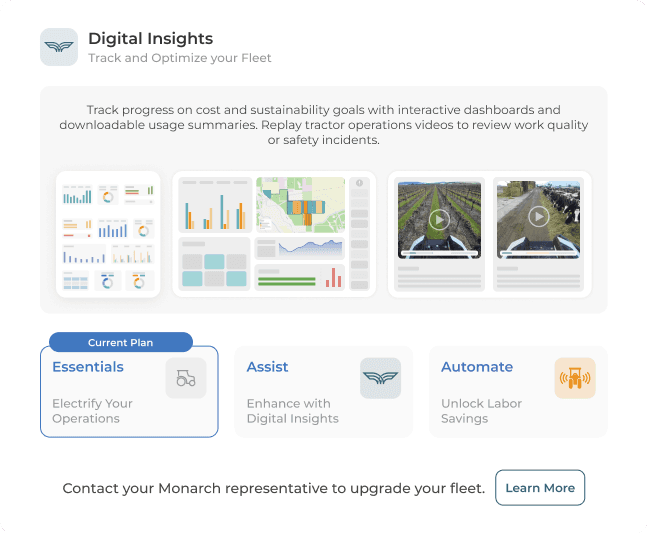
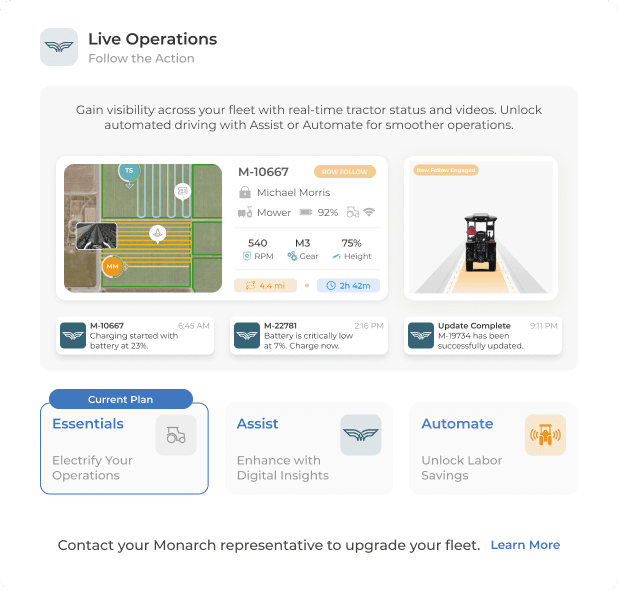
These locked screens make the gap between Essentials and higher tiers clear in the moment. When customers hit a restricted feature, they see what’s unavailable and a direct path to upgrade. The experience stays predictable, and users are not left guessing why something changed.
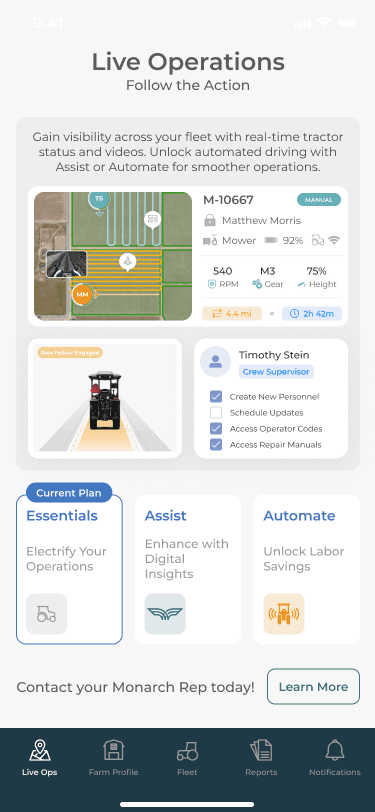
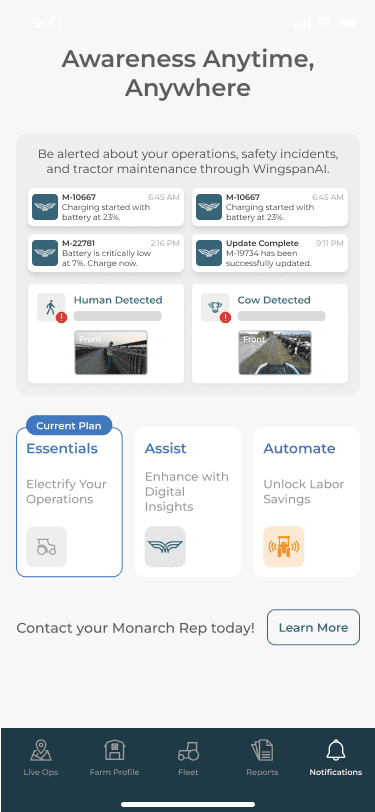
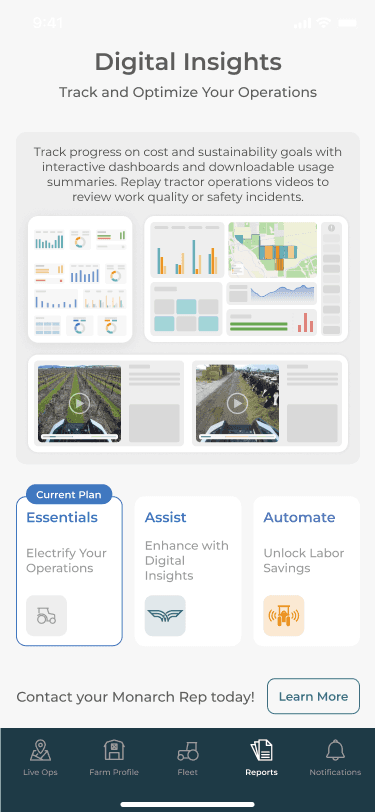
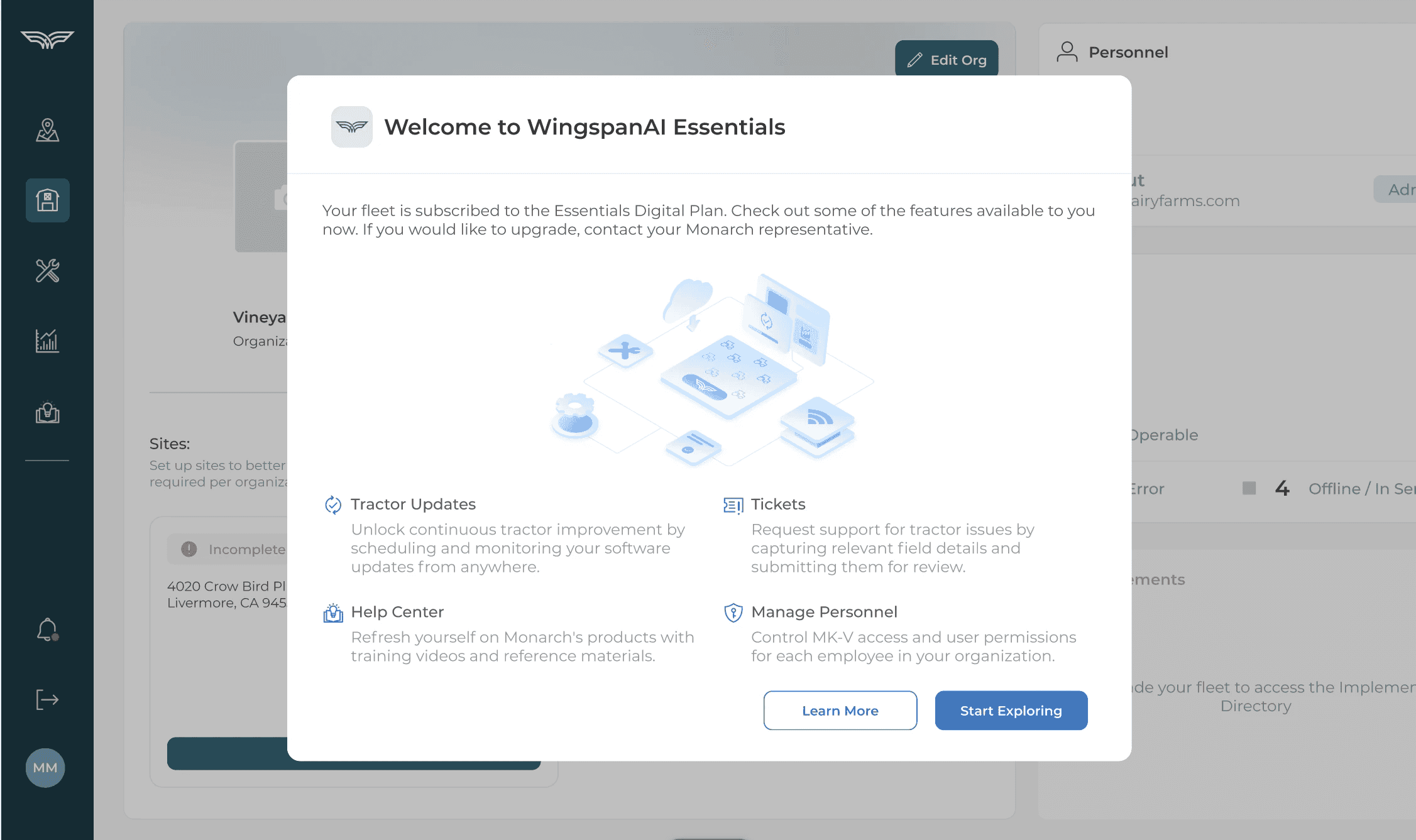
Instead of letting users discover missing features through broken workflows, this welcome message makes the Essentials tier feel intentional and complete. It confirms what’s still available, calls out what changed, and points customers toward upgrading when they’re ready.
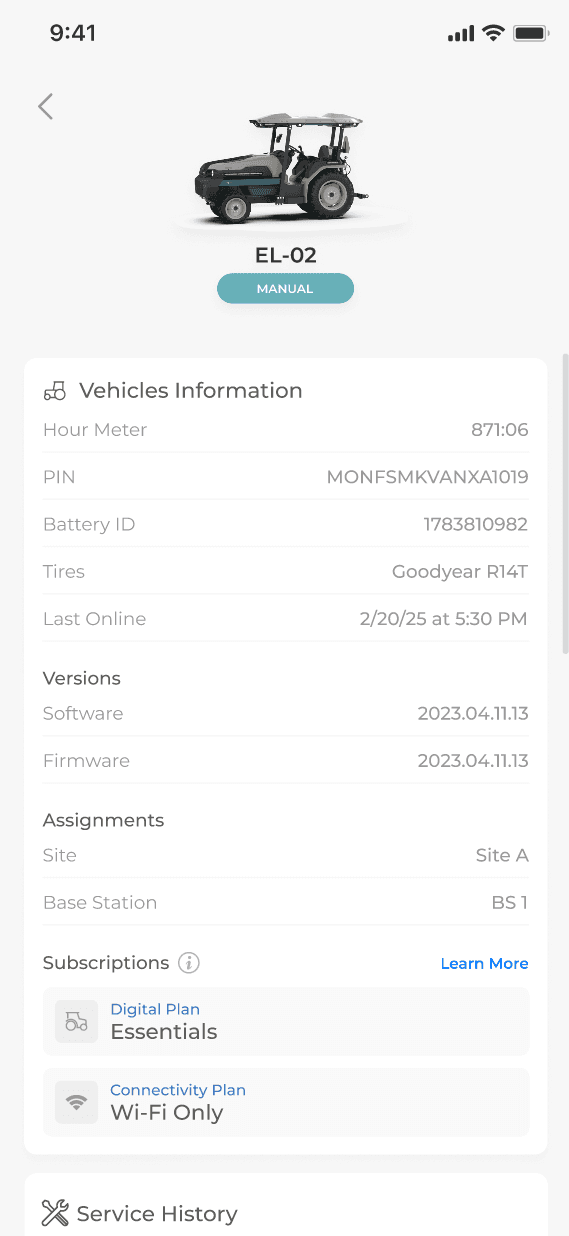
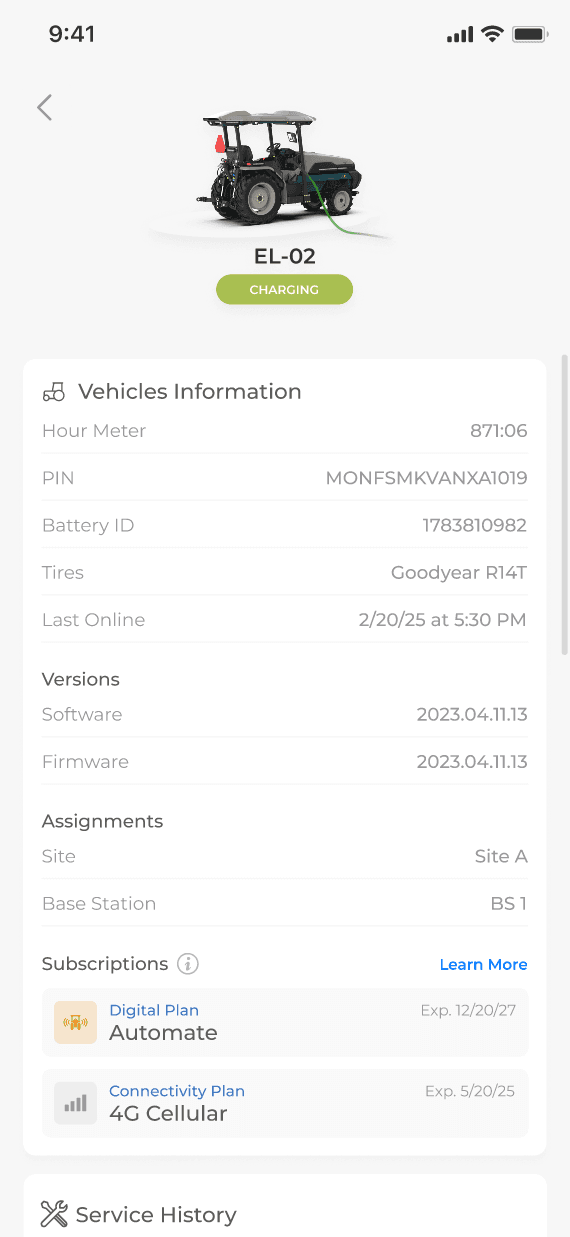
Subscription status is visible per vehicle, including expiration dates, so customers can confirm exactly what’s active on each tractor. This helped make the “included vs expired” shift concrete, especially for fleets managing multiple vehicles. From here, “Learn more” routes users into plan education and next steps.
Closing the Loop
In the end, I led the design work to operationalize a new subscription model across embedded, web, and mobile, turning an “included but expired” reality into a tier-aware product experience customers could actually understand. We shipped clear plan education, consistent locked states with upgrade paths, and an internal entitlement control tool that made it safe to manage feature access across mixed fleets. The rollout drove 24 customer upgrades and $28.8K in new ARR, while protecting core workflows from breaking during the transition.
Along the way, I gained a deeper appreciation for the cross-functional mechanics required to make a pricing change feel like a seamless product experience, including alignment with Sales, Finance, Marketing, Product, and Engineering, careful rollout planning, and rigorous edge-case validation around permissions and entitlements. This project sharpened how I design for trust during change, and how I translate complex business rules into UI that feels predictable, intentional, and easy to navigate.